Sunday, June 10, 2012
Small town parades and car shows....
Having spent the better part of last week in New York City confirmed that I really do live in small town America.
If there was any doubts our parade Saturday morning and cruising (old time car show) in the evening really drove home the point.
Click on any image to view larger.
As they clopped by I swore I heard one of the horses ask "does this ribbon make my butt look big?".
Not only do we have twirling teams, we start them young AND with attitude.
Sad thing about some of these cars is I remember them when they were new, long before they were antiques.
Friday, June 8, 2012
BlogWorld 2012 in NYC and other things...
There are a few things I wanted to let you know about.
Thing 1:
You may have noticed that the blog has not been as active this week as it usually is, but that's because I spent most of the week at BlogWorld in New York City!
Very cool, very exciting stuff (in a geeky, nerdy, blogger kinda way).
Soooo glad I went because I have picked up some new ideas for the blog that is (hopefully) going to make it even better than what it is now.
Thing 2:
While I was gone we received over a hundred requests for the Dave Hill action set and I wanted to let you know we will be emailing those out in the next couple days. If you would like a set all you need to do is drop us an email and you'll be added to the list of those who will be receiving them.
Thing 3:
We will be posting our interview with Lou Jones next week over at The Photography Podcast, so be sure to come back and check it out.
See you next week.
Tuesday, June 5, 2012
Free "Dave Hill" Photoshop actions...

Since our post last week on the "Gritty Dave Hill Look" one of our readers actually created two "Dave Hill" Photoshop actions to share with everyone here on Weekly Photo Tips.
The first action is simply a "one click" and the action is applied, the second action stops at each stage of the effect allowing you to "tweak" it to your personal taste.
If you would like this set of actions along with the instructions on how to install them into Photoshop simply drop us an email and we'll get them right out to you.

Monday, June 4, 2012
Look who was interviewed at BlogCastFM...

That would be yours truly.
:)
I have been a big fan of BlogCastFM for some time, it's a great place to go, an outstanding podcast to subscribe to if you are looking for insightful information on how to make your blog (or podcast) successful.
It's a great place to learn directly from folks who who have already experienced a good degree of online success.
So here is the link to BlogCastFM and here to take you directly to my interview.
Our first DSLR video gear review...
Though I am not a "video guy" the gentleman who shoots all of the videos for Weekly Photo Tips is.
So I asked Mark if he would take a look at the Flashpoint DV DSLR Matte Box Pro that Adorama was kind enough to send us.
Mark not only shoots all of our videos, he does extensive work on commercials and movies as well.
And for those of us who know him, we know he is... well... particular about what he uses, it needs to bring something to his workflow or he doesn't bother with it, so his gushing review of the Flashpoint DV DSLR Matte Box Pro surprised me, because he's just not the gushing kind of a guy.
So check out his video review below or if you have trouble viewing it (or simply don't see it) follow this link to view it directly on YouTube.
As we post this review Matte Box Pro it is on special for only $250 and that also includes free shipping.
A big thank you to Mark Hensley for taking the time to do this review (and for everything else he does for us) and be sure to check out his website and YouTube channel.
Friday, June 1, 2012
That Gritty Dave Hill Look...
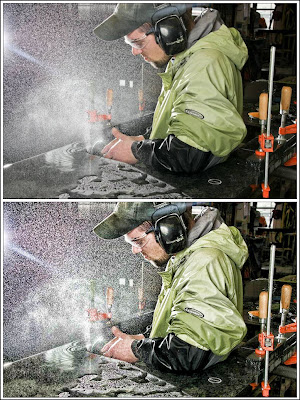
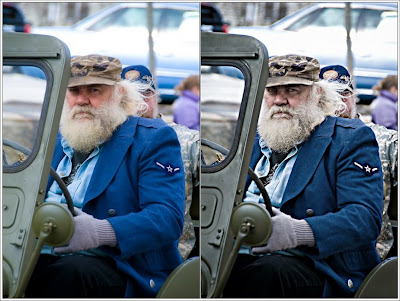
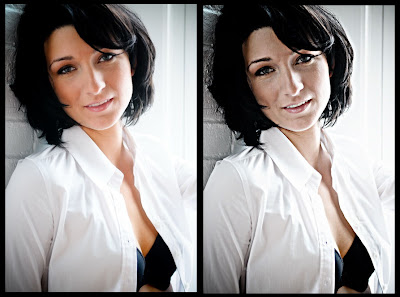
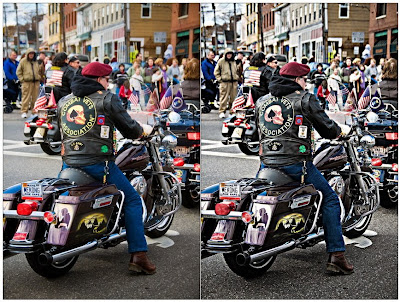
In the almost 5 years of Weekly Photo Tips the "faux" Dave Hill look is by far one of our most popular posts, so here it is again.
If you have not seen the work of Dave Hill you need to, please take a minute (or 10) and look at his incredible images.
Now to imply that the technique I am about to show you is "just like Dave Hill's" would be a like saying my child worn minivan is just like a Ferrari. The only similarities is that they both have license plates, after that all similarities come to an end.
Though the ladies do love my minivan, as it is the "sport" version.
;)
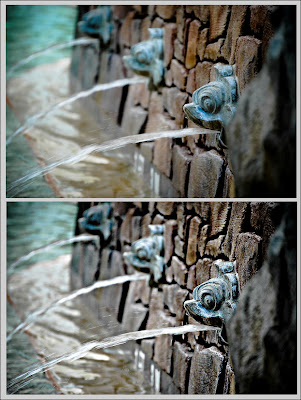
Anyway, the technique I am going to show you will give your images a cool gritty look and works on most images, but it does work best on high key images. Below are several of my examples.
And though it looks like a lot of steps, after you have done it a couple times it will take you only about a minute to complete (really).
So here goes:
Step 1:
Open your image in Photoshop and create a duplicate the layer.
Go to "Filter" - "Other" - "High Pass" set the Radius to 4 Pixels.
On the Layers palette select the "Vivid Light" blending mode.
Flatten the image.
Step 2:
Create a duplicate the layer (again).
Go to "Filter" - "Other" - "High Pass" set the Radius to 7 Pixels.
On the Layers palette select the "Color" blending mode with an opacity of 40%.
Flatten the image.
Step 3:
Create a duplicate the layer (one last time).
Go to "Filter" - "Blur" - "Gaussian" set the Radius to 9.5 Pixels.
Go to "Filter" - "Noise" - "Add Noise" set Amount to 3%.
Got to "Layer" - "Layer Mask" - "Hide All"
Now use the lasso tool and select only the eyes (assuming the image has eyes, for multiple selections hold the shift key).
Go to "Select" - "Refine Edges" - set "Feather" to 5-6 pixels, then "Select" - "Inverse"
Select the brush on your tool palette, set the brush opacity to 30% and brush over the entire image once.
Flatten the image.
Step 4:
Go to "Filter" - "Sharpen" - "Unsharp Mask" and use the following settings:
Amount 100%
Radius 30.0 pixels
Threshold 0 Levels
That's it, give it a try, and I would love to see your results.
If you click on any of the images below they will open larger and in a new window so you can have a better view of how the effect has changed each image.
Wednesday, May 30, 2012
Let's make it even bigger!...
Most of you know we are in the middle of our biggest and best contest ever, and today we are going to add yet another prize to the pot.
We are going to throw in a copy of "Off-Camera Flash" by Neil van Niekerk (you can read the review done by one of our readers here).
So if you would like to throw your hat (or image) into the ring and be part of our latest contest, you can get all the details, the (simple & easy) rules, and check out the phenomenal prizes right here (which includes the 7 DVD set from Strobist/David Hobby "Lighting in Layers", our 2011 product of the year).
Speaking of which, here are just a few of the many great images that you our readers have submitted (so far):
Subscribe to:
Posts (Atom)


